
In this text, I explain what WCAG is and the principles it is based on, how accessibility intertwines with SEO optimization, who is bound by the European Accessibility Act and what that means for companies from Serbia, and where you should start.
When a website is built, attention usually goes to design, speed, and features. Less frequently, the question arises whether that website can be used by everyone: people who have low vision, who do not use a mouse, or who need more time to read text. The answer to that question is provided by the WCAG standard.
In this text, I explain what WCAG is, what principles it rests upon, and why accessibility is a business topic: it affects how many people can buy from you, how search engines read your site, and whether you are compliant with the regulations of the market in which you sell.
What is the WCAG standard?
WCAG stands for Web Content Accessibility Guidelines. It is an internationally recognized set of recommendations and technical requirements whose goal is to make web content accessible to people with disabilities. The guidelines are developed by the World Wide Web Consortium (W3C), the main international organization for web standards. The current version is WCAG 2.2.
WCAG describes how to make website information and functions accessible to people regardless of their abilities. This includes people with:
- visual impairment (blindness, low vision, color blindness)
- hearing impairment
- motor difficulties that make it hard to use a mouse or keyboard
- cognitive and neurological difficulties (dyslexia, attention disorders, and similar)
Digital accessibility does not only help people with permanent disabilities. It also benefits people with temporary limitations, for example, with a broken arm, and everyone in an inconvenient situation, like when reading from a phone in bright sunlight.
Three levels of compliance
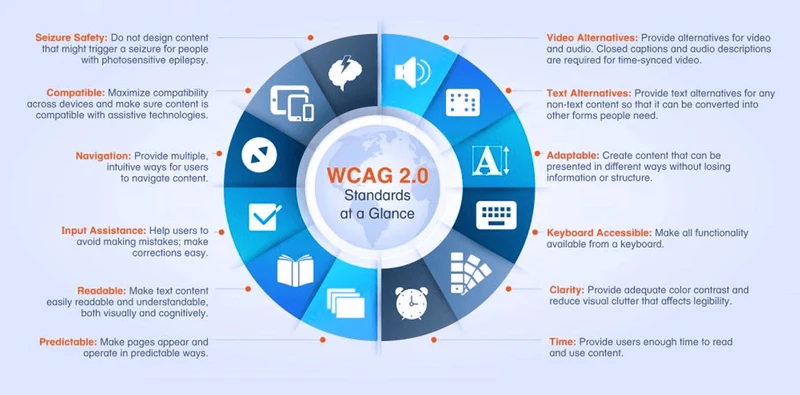
The requirements are divided into three levels: A is the minimum, AA is the level most commonly requested and worth setting as a goal, and AAA is the highest and is rarely applied to the entire website.
Four principles of WCAG: POUR
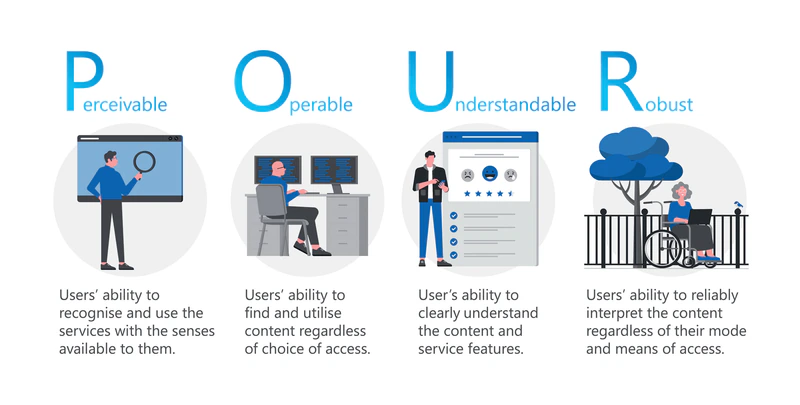
All requirements rest on four principles, known by the acronym POUR:
- Perceivable: information and user interface components must be presented to users in ways they can perceive, through at least one of their senses. Example: every image that carries information has alternative text, so a screen reader can describe it to a blind user.
- Operable: users must be able to use the navigation and all elements of the website. Example: the entire site can be navigated using only the keyboard, without a mouse.
- Understandable: the content and behavior of the interface must be clear and predictable. Example: navigation is the same across all pages, and forms have clear instructions and error messages.
- Robust: content must work reliably across a variety of browsers and with assistive technologies, such as screen readers. Example: clean, semantically correct HTML code.
Why is accessibility important for your business?
The reasons can be boiled down to three: a larger audience, a website that search engines can read more easily, and compliance with regulations.
Larger audience
According to data from the World Health Organization, about 1.3 billion people, or 16% of the world's population, live with a significant disability. This figure includes all types of disabilities, not just those affecting screen use, but it shows how large of a group this is. A website that these people cannot use practically does not exist for them, so they go where they can complete a purchase or send an inquiry.
Accessibility and SEO
Accessibility and SEO rely heavily on the same things: clear structure, text describing the content, and correct code. What helps a screen reader understand a page also helps a search engine.
- Alt text on images: tells the search engine what is in the image.
- Heading structure (H1, H2, H3): clear hierarchy makes it easier for both screen readers and search engines to understand what the page is about.
- Transcripts for video and audio: content that would otherwise be inaccessible becomes readable and indexable text.
- Descriptive link text: a link that says where it leads is useful to both the user and the search engine.
I am not claiming that accessibility is a ranking factor in itself. I am claiming that an accessible site has an orderly structure and understandable content, which are the foundations upon which good SEO also rests. In addition, a website that is easier to use is less likely to be abandoned by visitors before they complete what they came for, which is a benefit regardless of search engines.
Regulations and responsibility
Digital accessibility regulations are becoming stricter. In the European Union, the European Accessibility Act will apply from June 28, 2025, requiring certain products and services intended for consumers, including online sales and banking services, to be accessible. The act itself describes what needs to be achieved, and WCAG rules for design and code are a practical way to do that on a website.
Besides regulations, accessibility also speaks to how a company treats people. A website that everyone can use shows that you care about all users, not just those who are the easiest to sell to.
Who is bound by the European Accessibility Act and what does it mean for companies from Serbia
The European Accessibility Act is Directive (EU) 2019/882. Member states have transposed it into their national laws, and the requirements apply to products placed on the market and services provided to consumers after June 28, 2025.
The Act does not apply to all websites. It applies to certain products and services intended for consumers in the EU, among which are:
- e-commerce services, i.e., online sales to consumers
- consumer banking services
- e-books and software for reading them
- electronic communications services
- parts of passenger transport services, such as websites, apps, and electronic tickets
- products such as computers, smartphones, e-book readers, and self-service terminals (ATMs, ticket machines)
There is also an exception: the directive does not bind micro-enterprises providing services. A micro-enterprise is, according to the directive, a company with fewer than 10 employees and an annual turnover or balance sheet of up to 2 million euros. How requirements are monitored and what the fines are is regulated by each member state through its own law, so the rules may differ in detail from country to country.
Serbia is not an EU member, so this act does not bind a company operating only on the domestic market. It becomes important when you sell on the EU market, for example, if you sell to customers in member states via an online store or offer EU consumers any of the listed services. In that case, it can be expected that the requirements will apply to you as well, and accessibility may also be requested by the EU partners you work for.
This is general information, not legal advice. Whether and how the act applies to your company depends on what you sell, to whom, and in which country, so please check this with a lawyer who knows the regulations of that country.
Where to start: three first steps
- Determine if you are bound by regulations. Write down what you sell, to whom, and in which markets. If you sell to consumers in the EU, talk about this with a lawyer before making any changes to your website.
- Check where the website is now. Navigate the most important pages using only the keyboard, run a free tool like Lighthouse, and compare what you find with a practical WCAG checklist.
- Fix first what prevents a purchase or inquiry. Forms, navigation, text contrast, and buttons have priority over pages that few people open. Schedule the rest for subsequent website updates.
If you are not sure how accessible your website is and what the priority is, a UX audit of the website is a good first step.
Accessibility is a decision, not an add-on
The question is no longer whether to apply the WCAG standard, but in what order to do it. Accessibility is not just an expense: it leads to a website that is easier to use, which search engines understand better, and which can be used by more people.
A practical example is the UX/UI design of the Vakel Wallet admin panel.
This is not just a task for developers and designers, but a decision by the owner about whom the site is intended for. It is easier to make it now, while the choice is yours, than when it is requested by regulation or a large buyer.