
UX Design and Analytics
How to use data and analytics to make better UX decisions
UX basics and processes

Imagine you are building a bridge. You wouldn't build it without checking the load capacity, materials, and traffic flow, right? It's similar with digital products. Data gives us a real picture of how users actually use our product, not just how we think they should.
The goal of this text is to clarify the process itself. I will explain when, how, and why to include analytical insights into UX decision-making, and how this affects design quality and your business results, from increasing conversions to strengthening loyalty. If terms like wireframe or persona are not clear to you, study the basic UX/UI and design terminology.
The role of data in the modern UX process: an end to assumptions
In the traditional approach, the UX process was often linear: research, then design, and finally implementation. Today, it is a cyclical, iterative process in which analytics plays a role in every phase.
Data as a guide for iteration
Data is your compass: it guides you on what to do next. Data-driven design (data-driven design) implies constant collection, analysis, and application of data.
Before design (research): data serves to define the problem. Which part of the conversion funnel is "leaking"? Which pages are users abandoning en masse (bounce rate)?
During design (prototyping): data from earlier testing or existing products serve to develop prototypes. For example, if mobile users don't see the key "Add to Cart" button, the prototype will fix that.
After implementation (measurement): this is the most important part. The impact of the new change is measured. Did the redesign actually improve the desired conversion metric?
When you stop relying on "I think this would be better" and start saying "The data shows this is better," design decisions become more reliable and easier to defend.
Analyzing user behavior leads to better design decisions
Analyzing user behavior is not just about looking at numbers. It is an attempt to understand why users behave in a certain way.
Key metrics for user flow optimization
To make the right UX decisions, you must track the right metrics. They are divided into active (what the user does) and passive (the result of those actions).
Conversion rate (conversion rate): the percentage of users who complete a desired action (purchase, sign-up, download). This is the most important business result of UX, and more about this is written in the text on how UX design affects conversions.
Drop-off rate: where users drop out during key flows (registration, purchase). UX design here deals with reducing friction.
User retention: how many users return to the product. Good UX is one of the main reasons they come back.
Time on task: how long it took the user to complete a key action. The faster they reach the goal, the experience is generally better.
By analyzing the Customer Journey Map and tracking these metrics, you know exactly where to invest design effort. For example, if you have a high abandonment rate at the payment step, the solution is not to change the font, but to simplify the data entry form.
For a broader picture of business impact, read why UX design is important for marketing and conversions.
Application of qualitative and quantitative data
Good UX decisions require balance. You need to know what is happening (quantitative) and why it is happening (qualitative).
Quantitative data: what (and where) is happening?
Quantitative data are numbers, statistics, and metrics from tools like Google Analytics, Mixpanel, or Adobe Analytics.
Role: they answer the questions how much, where, and when. They reveal anomalies, trends, and the exact location of the problem.
Examples of tools: click heatmaps, scrollmaps, funnel analysis.
Quantitative analysis, for example, tells you: "55% of users leave page X." Analytics also often reveals some of the 10 design mistakes due to which a website loses customers.
Qualitative data: why is it happening?
Qualitative insights are direct feedback, observations, and opinions of users.
Role: they answer the questions why, how, and what the user thinks or feels. They reveal motivation, pain points, and context.
Examples of tools and methods: user testing, interviews, surveys, session recordings.
Qualitative analysis, for example, reveals to you: "Users leave page X because the address input field is confusing."
Rule: use quantitative data to find the problem, and qualitative data to understand its cause.
How to properly test hypotheses based on data (A/B testing)
When data points to a problem and you get qualitative insight into the cause, it is time to form a hypothesis and test the solution.
Defining a simple hypothesis
A good hypothesis always follows the format:
If we change X (variable), it will result in Y (expected change), which will lead to Z (business outcome).
Bad hypothesis: "We are redesigning the entire checkout process, it will probably be better."
Good hypothesis: "If we move the 'Sign Up' button from the menu to the homepage (X), we expect to increase the conversion rate for registration by 10% (Y), which will improve new user retention (Z)."
Practical A/B testing
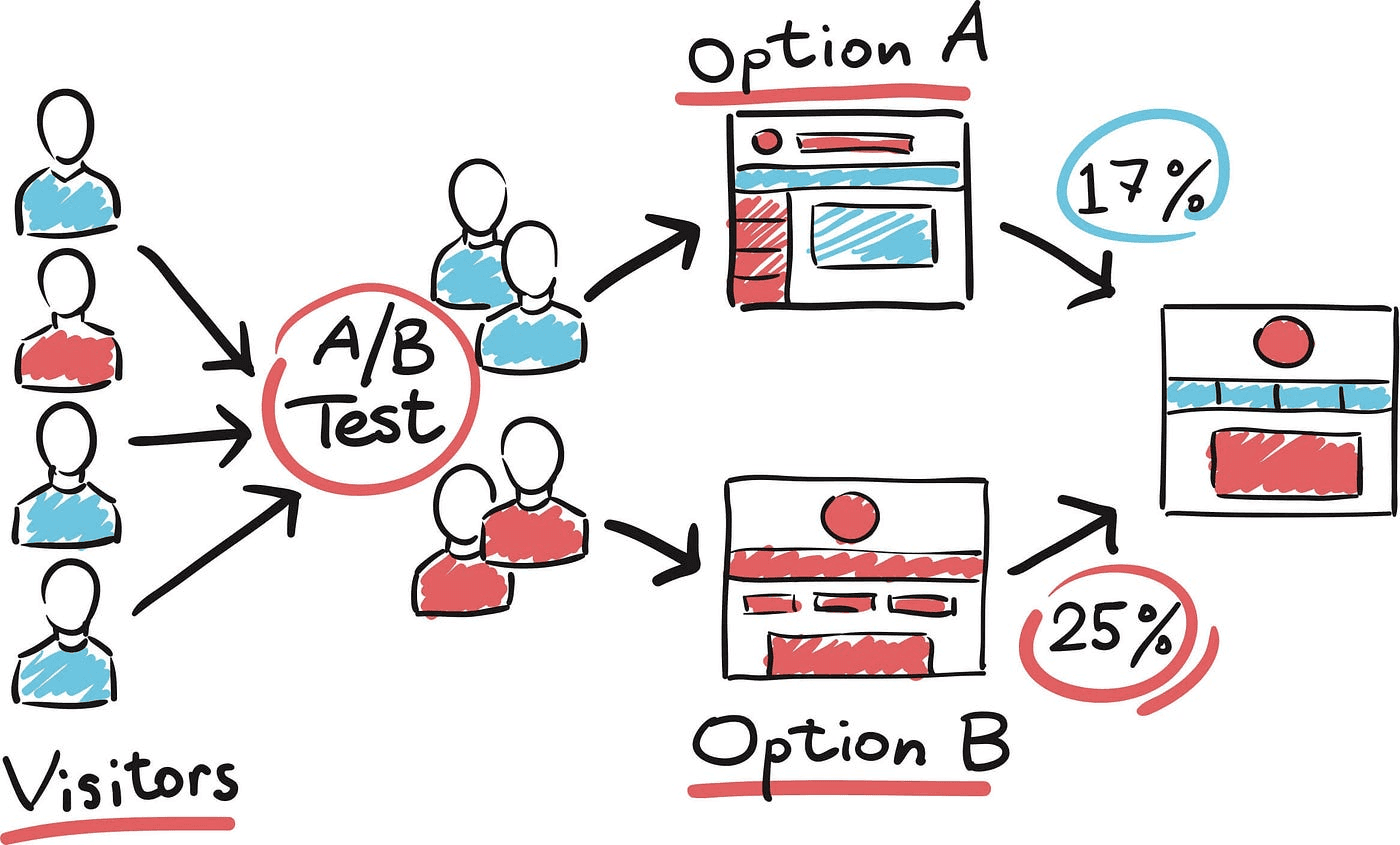
A/B testing (split testing) is the standard way to verify a hypothesis on real users.
Set up the test: split traffic between the control version (A, current design) and the variant (B, your proposed solution).
Measurement: let the test run until you achieve statistical significance, which requires a sufficiently large number of visitors and conversions. Do not stop the test prematurely.
Analysis: if variant B outperforms version A in key metrics, the hypothesis is confirmed and the change is implemented.
Remember: even a negative test result is useful data. It tells you that this solution does not work, but that the problem still exists. Keep iterating.
Examples of optimizations based on analytics
Data is only valuable when it is turned into a decision. Here are a few illustrative examples of what that can look like (numbers are made up for the sake of the example):
Analytical insight | UX design decision | Expected business outcome |
Quantitative insight: 70% of users click on the heading before entering a search in the field. | UX solution: remove the heading and leave only an empty search field with placeholder text (placeholder). | More active searches and shorter time to find the product. |
Qualitative insight: users in surveys say they do not see the refund option. | UX solution: place a clear link to the refund policy right next to the purchase button. | More trust, less doubt, and more conversions. |
Quantitative insight: mobile users struggle with typing their email address and make mistakes. | UX solution: use fields with automatic completion (autofill) and introduce passwordless login. | Lower abandonment rate at the registration or login step. |
How to present data to management and clients
When presenting data to management and other stakeholders, you should move from numbers to business value.
Tell a story: don't just present charts. Say: "Because of this problem (data from analytics) we introduced this solution (UX decision), and it brought this result (conversion increased by X%)."
Use business language: instead of "We reduced latency by 200 ms," say "We shortened page load time, which increased the conversion rate on mobile devices and brought X euros more revenue."
Be transparent: show failed tests too. This shows that you are methodical and learn from data, rather than guessing.
Next steps: finish with a clear work plan. What is the next priority problem to be solved?
Analytics and data are a basic necessity of UX design today, not an add-on. When you find a problem with quantitative data, and understand the cause with qualitative insights, you make decisions based on what users actually do.
Data-driven UX design is not a compromise between aesthetics and functionality, but a way to align the two. The result is a product that not only looks beautiful, but solves real user problems and brings measurable business results.
What this looks like on a real project is shown by the UX/UI design of the Vakel Wallet admin panel.
Start today: choose one "most painful" part of the user flow, set a hypothesis, and test it. After the first test, you will have concrete data to move forward from.
What is data-driven UX design?
Data-driven UX design is an approach where all user experience design decisions are based on the analysis of collected data, rather than on intuition or opinions. This approach uses quantitative and qualitative data about user behavior to define problems, test hypotheses, and measure the impact of changes on conversion metrics and other business goals.
What are the most important metrics for measuring the success of UX design?
The most important metrics for measuring the success of UX design are those directly related to conversion optimization and user flow efficiency. Key metrics include: conversion rate (whether the action was completed), drop-off rate (where the action is abandoned), time on task (how long it takes the user to complete the action), and user retention (whether users return).
What is the difference between quantitative and qualitative data in UX?
Quantitative data answers the question of what and where the problem is occurring (e.g., most users abandon their shopping cart). These are numbers and statistics. Qualitative data answers the question of why the problem is occurring (e.g., users are confused by the shipping price). These are insights from user testing, interviews, and surveys.
How does A/B testing help in UX decisions?
A/B testing helps in UX decisions by enabling a direct comparison of two versions (A and B) of a design element, based on data testing. It is the best way to validate a hypothesis before full implementation. Through A/B testing, the team can learn which design decision (e.g., different text on a button, changed layout) has a statistically significant positive impact on key metrics.
When should analytics be integrated into the UX process?
Analytics should be integrated into the UX process continuously, across all phases. Before design, to identify problems (where users "struggle"). During design, to inform prototyping (based on insights from heatmaps and session recordings). And most importantly, after implementation, to measure the impact of the change on user behavior and business results, thereby closing the data-driven loop.

Senior UX/UI and product designer from Belgrade, with more than 10 years of experience. He has collaborated with clients such as MerchKing, Bex courier service, Balkan Group, Maeti, 502 Solutions, DataWiz, and many others. He holds Google and Adobe specializations and a Uxcel certification in UX/UI design.