
Business reasons for Framer: a fast website, neat SEO basics, and a marketing team that makes changes on their own, without waiting for developers. Plus, when Framer is not the right choice and two ways to get your website.
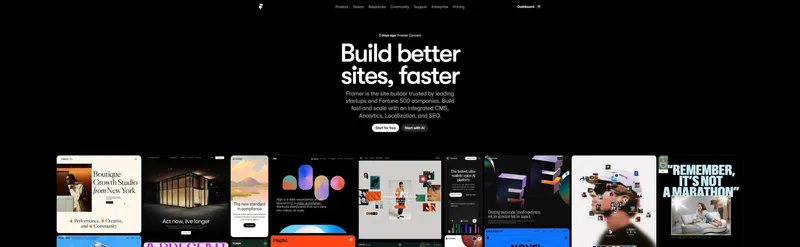
Building a landing page in many companies goes like this: a designer draws the page in Figma, the design then waits for developers for weeks, and what finally comes out does not look quite as agreed. The marketing team, in the meantime, cannot launch the campaign.
Every day of waiting has a price. The campaign is delayed, and every minor change to the headline or offer goes back to the queue for the developers. When the page finally goes live, it is often slow, so some people leave before they even see the offer.
Framer shortens this chain because the page is designed and published in the same tool. For a business owner or marketing team, this is not just a technical decision, but a decision about how quickly you can react and how much each change costs you.
Note: The links to Framer in this text are affiliate links, which means I receive a commission if you purchase a subscription through them.
In this article, I cover the business reasons for choosing Framer: site speed, search visibility, team independence, and costs. I also list where Framer is not the right choice, and finally, two ways to get your website up and running.
Why website speed comes first
When I build a website, speed is my top priority for a simple reason: people leave a page that doesn't open quickly. The ad is paid for, the click happened, but the visitor didn't even see the offer.
Websites built in Framer are built on React and delivered via a global server network (CDN). The visitor gets a pre-rendered page, instead of waiting for the server to assemble it from a database on every visit. There are also no plugins to install and maintain, which are often what slows down websites on older systems.
This doesn't mean that every Framer site is fast by default. Speed is still determined by what you put on the page:
- Images and video. Oversized photos and autoplaying videos will slow down any page, regardless of the platform.
- Animations. Every effect has a cost. A few well-thought-out ones are fine; dozens of them are not.
- External scripts. Analytics, chat, and ad tracking tools add loading time, so keep only the ones you actually use.
- Fonts. Two fonts are usually enough. Every additional one is another file the visitor has to download.
That's why you should measure your website speed yourself, for example with PageSpeed Insights, instead of trusting general claims about any platform.

How speed affects conversions
The goal of a landing page is one clear action: for the visitor to leave an email, schedule a call, or buy. A slow page loses some people before they even get to that action, so you are paying for visits that never had the chance to become leads.
The other side of the same story is the speed of changes. Conversion rate is improved by testing: a different headline, a shorter form, a clearer offer. If every such change waits for a developer, you will only do a few a year. If the team makes them themselves, you will try many more variations and learn faster what matters to your customers.
SEO and visibility in AI search
In addition to traditional Google search, people are increasingly looking for answers in tools like ChatGPT and Perplexity. Both find it easier to understand a website that has a neat structure and clearly written content.
Framer provides the foundation for this: every site gets an SSL certificate, titles and descriptions are set per page, page URLs are clean, and redirects are set up directly in the tool. The tool itself, however, will not rank the site. That still depends on the content, heading structure, and how useful the site is to the people visiting it.
For companies operating in multiple markets, Framer has localization, so you can run the same site in multiple languages, with translated page URLs.
Structured data
Structured data (JSON-LD) is code that tells search engines what is on the page: an article, a service, FAQs, an author. Framer allows you to add it through custom page code, and for CMS content, it can be populated from collection fields.
Whether Google will display a rich result depends on the quality and relevance of the site, so no one can guarantee it. Clean data, however, helps both search engines and AI assistants understand exactly who you are and what you offer.

Animations with moderation
Animation on a website makes sense when it serves a purpose: a button hover effect shows it can be clicked, content fading in guides the eye down the page, and a confirmation after submitting a form indicates the submission went through. Framer offers these interactions without writing code, including more natural, spring-physics-based transitions.
Personally, I avoid heavy animations and effects that slow down the page. I only add animation if the page remains fast with it. An effect that looks impressive in a presentation but delays loading for a visitor on a phone works against you.
Marketing team independence
The value of Framer for a company is not just in the website itself, but also in who can modify it. In the traditional workflow, handing over the design to developers is a bottleneck. Here, the designer publishes the page themselves, and texts, images, and CMS content can be modified by someone from marketing after a short training session.
From Figma to a finished site
Many teams start their design in Figma. Framer has a plugin to transfer designs from Figma, so you don't start from scratch. The transferred design still needs to be cleaned up: adjust the layout, set up mobile views, and configure components. The benefit is that there is no phase where someone else rebuilds the same design in code from scratch.
For campaigns, this means that a new landing page depends on your team, not on someone else's schedule. Multiple people can work on the same project at the same time, so the designer and the copywriter don't have to wait for each other.
Examples of companies using Framer
These are not my clients, but examples published by Framer itself. I list them to show what kind of companies choose this tool for their marketing websites.
Superhuman
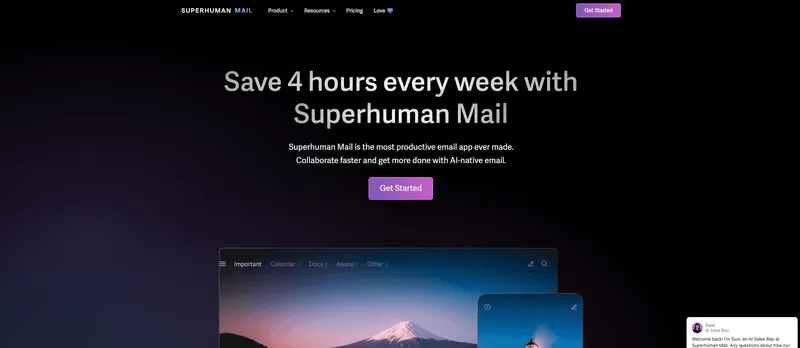
Superhuman is an email client designed for people who value speed. Their website was previously maintained by developers, which slowed down changes. According to Framer's description, they switched to Framer so that non-developers could also create and edit pages. Read more about this in Framer's Superhuman case study.
Stack AI
Stack AI builds a platform for enterprise AI agents. They use Framer and its CMS for their website, as described in Framer's Stack AI case study.
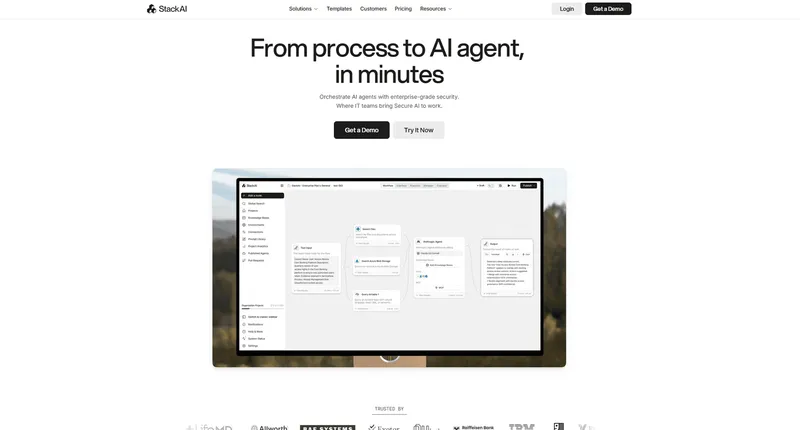
What they have in common is keeping the marketing site separate from the product itself. This way, the marketing team manages the website, while the developers stay focused on the product.
Framer compared to Webflow and WordPress
In short: Webflow is a strong choice for complex, content-heavy websites, but it requires you to understand how CSS classes and code structure work. WordPress has a massive ecosystem, but it comes with hosting, plugins, and regular maintenance—costs that are easy to overlook at first. Framer is the closest to the way designers already work, and hosting and platform maintenance are included in the price.
I wrote a detailed comparison, showing situations where each option is better, in the article Framer, Webflow, or custom code.
When Framer is not the right choice
Framer is great for landing pages, company websites, SaaS marketing sites, portfolios, and blogs. It is less suited for large online stores with many products, inventory management, and complex checkout systems, as well as websites that require custom server-side logic.
You should also know that you cannot simply export the site and move it to another hosting provider. The design and hosting are tied to the platform. For most small businesses, this is an acceptable price to pay for not having to worry about servers and updates, but it is only fair to know this before making a decision.
Two paths to a new website
Option 1: Build it yourself
If you are a designer or have someone in your team who wants to take over the website, you can start right away. I described the entire process in the guide how to build a landing page in Framer step-by-step.
Create a free Framer account and try out the tool on a real page. That is the quickest way to see if it fits your workflow.
Option 2: Let me handle the job
If you don't have the time to learn a new tool, I can build the website for you. Here is what you get:
- A completed Framer website delivered on schedule.
- Configured technical SEO basics: titles, descriptions, redirects, and structured data.
- Animations applied with moderation, so the page remains fast.
- Training for your team, so you can change texts and images yourself in the future.
An example of a website I built in Framer is the Marketit agency website.
Get in touch for a free basic UX review of your current website. I will go through your site page by page and briefly tell you what needs improvement. A detailed audit is a separate, paid service.